


Employee Link・Time Tracking
4.872.00 Reviews
App Specs
- Version
- 21.0.2
- Updated On
- License
- Free
- Downloads
- 50,000+
- Developer
- Magnify Technologies Inc
- Categories
- Business
- Platform
- Android
Screenshots
 Analysis by AppCompare
When I first open a workplace timekeeping app, I want to know one thing: will it make clocking in and keeping hours straight easier, or will it add another task to my day? Employee Link - Timesheets is aimed at employees and managers who need a shared place for time records and work schedules. It comes from Magnify Technologies Inc and sits in the business-app space. The basic download is free, while optional in-app purchases range from $4.99 to $499.99 per item, so it is worth checking what your workplace expects you to use before assuming every function is included at no cost.
What to expect from a workplace timekeeping app
The app’s central idea is practical rather than complicated: employees can record when they start and finish work, while the employee portal and schedule tools give a team a common point of reference. That makes it most useful when a workplace already has a process for using it. If your manager has not set up the organization or explained which timekeeping steps matter, installing it alone may not get you to a useful timesheet.
I would think of it as a work tool, not a personal stopwatch for every project. A shift-based employee who needs to record attendance has a clearer reason to use it than a freelancer looking to divide a day among clients. Before your first shift, ask which account or workplace details you should use, whether you are expected to check a schedule in the app, and how your manager wants missed punches handled. Those small questions can prevent an avoidable correction later.
Getting ready for your first successful shift
The first meaningful success is not merely opening the app; it is making a time entry that your workplace can recognize and review. Start by signing in with the details your employer provided and checking that you are connected to the right workplace. Then look for the clock-in and clock-out controls and confirm the expected routine with your supervisor. A clear routine matters because a time record is only useful when the whole team understands how to use it.
For a first shift, I’d keep the workflow simple: check the schedule before work if your team uses it, clock in when you are meant to start, and make a point of clocking out at the end. If you notice a missed or incorrect entry, raise it promptly rather than waiting until the end of a pay period. The app can help make records easier to manage, but a manager may still need to review or approve them, so I would not treat a tap as proof that every payroll step is complete.
Getting Started with Employee Link
Diving into Employee Link - Timesheets is as easy as pie. Just download the app, and you’re off to the races. The initial setup is a breeze, and even if you’re not the most tech-savvy person out there, you’ll find it straightforward. The app guides you through each step with clear instructions, so there’s no room for confusion.
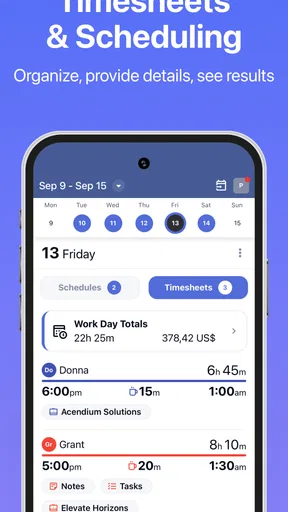
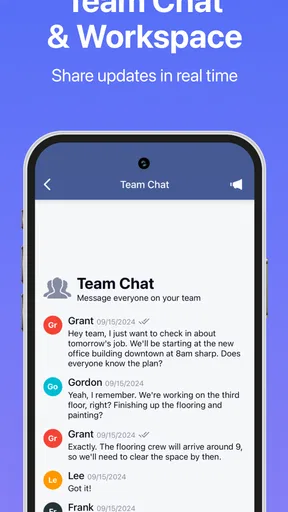
Once you’re in, you’ll be greeted by a clean and intuitive interface. Everything is laid out neatly, making it simple to navigate. The main dashboard gives you a bird’s-eye view of your current projects, hours worked, and even upcoming shifts if you’ve scheduled them. It’s all about keeping things clear and concise, which I absolutely appreciate.
Worth Reading Before You Choose

Flipboard Shows What News Apps Must Do Beyond the Feed

Switching to Android Auto Means Rethinking Your Driving Routine

Google Calendar Makes a Crowded Week Easier to Manage

Ludo King Makes the Most of the Minutes Between Plans

Baby Panda World Brings Quick Play to Modern Phones, but Its Game Library Feels Busy

ESPN’s Live Game View Makes Following Close Games Easier
Features That Stand Out
Let’s talk features. Employee Link is packed with all the essentials you’d expect from a top-notch time tracking app. One of the highlights is the real-time tracking capability. You can clock in and out with just a tap, and the app records your hours automatically. No more guesstimating or manual entries!
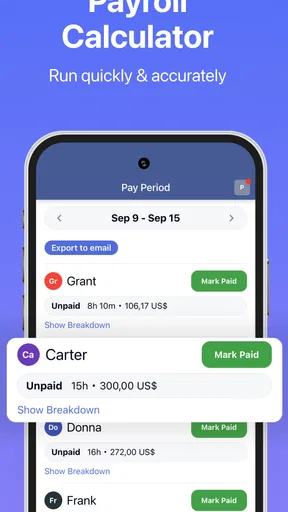
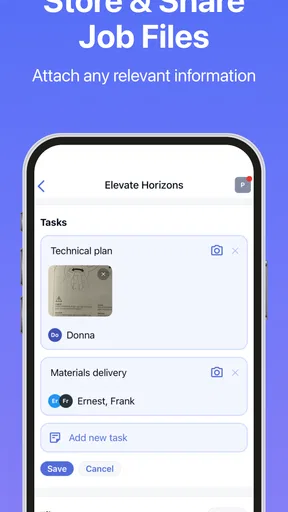
Another gem is the ability to manage multiple projects simultaneously. If you’re juggling different tasks, you can switch between projects effortlessly and track your time on each one individually. The app also integrates with various payroll systems, making it a breeze to export your data when payday rolls around.
For supervisors or managers, the app offers an overview of the entire team’s hours. You can approve timesheets, manage schedules, and even send reminders to employees who might have forgotten to clock in or out. It’s like having a personal assistant right in your pocket.
Making records easier to review
A useful habit with any clock-in app is to check your own entries while the day is still fresh. If a shift changes, an unexpected break happens, or you arrive at a different time than planned, note the discrepancy and tell the person who handles time approvals. That is more reliable than trying to reconstruct a week of work from memory. The app can organize recorded hours, but good records still depend on employees noticing errors and managers resolving them.
For a small team, the manager view can reduce the back-and-forth of collecting paper sheets, especially when reminders help catch a forgotten punch before approval. A sensible workflow is to agree on when employees should review their hours and when supervisors will approve them. That shared routine is more valuable than checking the dashboard repeatedly: it gives everyone a clear moment to correct exceptions without turning timekeeping into a constant distraction.
One trade-off is that digital records can feel less forgiving than a paper note. If someone forgets to clock out, they may need a manager to correct or approve the entry, depending on workplace practice. I would not assume every error can be fixed by the employee directly. Ask about the correction process early, and keep a brief personal note of unusual shift changes until the official record looks right.
Where it fits—and where another tool may suit better
Compared with paper timesheets, Employee Link offers a more immediate way to record attendance and gives managers a shared view rather than a stack of handwritten totals. Compared with a general calendar, it is more focused on work hours and timesheet review. A calendar can still be better for planning personal appointments or tracking a broad project timeline, while a dedicated business system makes more sense when the employer needs attendance records tied to its own approval and payroll routines.
This distinction matters for independent workers. If you need to bill several clients by task, generate invoices, or analyze how long each kind of work takes, a freelancer-focused time tracker may be a better match. Employee Link is most compelling when the workplace is the center of the workflow: schedules, clocking, employee records, and manager review. I would not choose it solely because I want a private log of hours if my employer does not use it.
A realistic example is a part-time employee whose shifts change from week to week. Before leaving home, they can check the work schedule if the employer maintains it there; at the workplace, they record the start of the shift, then clock out when finished. Later, they can review the recorded hours and flag a mismatch while remembering what happened. That simple sequence can replace a paper note and a later conversation based on guesswork, provided the team agrees on how to handle exceptions.
The app is likely to be a better fit for employees who want a straightforward way to follow their organization’s timekeeping routine, and for supervisors who need to review hours and schedules in one place. It is less suitable for someone who wants advanced personal productivity analytics or a standalone billing workflow. I would also be cautious if your workplace has not explained who owns the account, how schedules are maintained, or how corrections are approved; those are process questions an app cannot settle by itself.
Why I Love It
Now, let me share why I’m a fan of Employee Link. First off, it saves a ton of time. Gone are the days of chasing down employees for their hours or dealing with messy paperwork. Everything is digital, organized, and accessible with just a few clicks.
Plus, the app’s reliability is top-notch. I’ve yet to encounter any glitches or crashes, and the updates keep rolling in to enhance functionality. It’s clear that the developers are committed to providing a seamless experience.
But what really seals the deal for me is the customization options. You can tweak settings to match your specific needs, whether it’s setting up notifications or adjusting project details. It’s all about making the app work for you, not the other way around.
Practical questions before relying on it
One question I would settle before a first shift is whether the employee or manager is expected to handle a missed punch. The answer may be a workplace rule rather than a button in the app, so it is better to know whom to contact than to leave an incomplete record until payday. I would also check whether your manager expects you to review a timesheet before approval, since a quick check can catch a wrong start or finish while it is still easy to explain.
Another practical point is access: if you change phones or cannot sign in, your supervisor or workplace administrator is the right person to ask about restoring the correct account. Avoid creating a second workplace profile just to get around a login problem, since separate records can make your hours harder to review. For the same reason, confirm you are looking at the schedule and timesheet associated with your actual employer rather than treating the app as a personal notebook.
The free download lowers the barrier to trying it, but the available in-app purchase range is broad. I would ask the employer which plan or functions are relevant before paying for anything personally. In a workplace setup, the manager’s arrangement may determine what employees can use, and an employee should not need to guess which purchase is appropriate. The app is rated for Everyone, has an average rating of 4.6 from around 1.2 thousand ratings, and has been installed over 50 thousand times; those figures suggest an established audience, but they do not replace checking whether your particular team supports it.
My take after weighing the workflow
Employee Link is a sensible choice when the goal is dependable attendance tracking within a workplace that has adopted it. Its strongest advantage is not a flashy feature; it is the chance to put clocking, schedule awareness, and timesheet review into a single work routine. For a new user, the best way to get value is to learn the employer’s process first, make one clean clock-in and clock-out record, and check that it appears as expected.
It is not a universal answer to every time-management problem. A team that needs a different payroll or project-accounting workflow should compare its existing system before switching, and an individual who only wants to measure personal focus may prefer a lighter tracker. The current version is 20.9.3, and the app supports Android 7.0 and newer. That makes it worth considering for compatible devices, though your workplace’s own setup is still the deciding factor in whether it will be useful day to day.
Wrapping It All Up
To sum it up, Employee Link - Timesheets is a game-changer for anyone who needs a reliable, easy-to-use time tracking solution. Whether you’re a solo freelancer or managing a team, this app has got your back. It streamlines processes, eliminates paperwork, and keeps everything organized.
If you’re tired of the old-school ways and ready to embrace a more efficient workflow, give Employee Link a shot. You can thank me later when you realize how much smoother your work life becomes. So, go ahead, tap that download link, and step into the future of time tracking.
Pros
- User-friendly interface enhances productivity.
- Supports multiple job sites seamlessly.
- Integrates with payroll systems efficiently.
- Real-time tracking improves accountability.
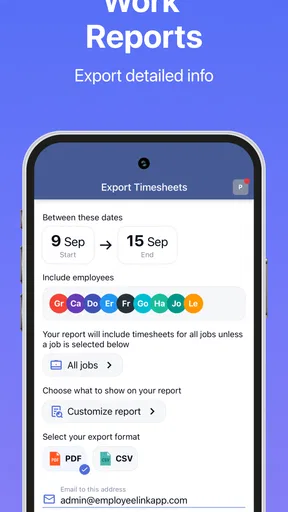
- Customizable reports for detailed insights.
Cons
- Limited offline functionality can be restrictive.
- Initial setup may require technical help.
- Some features behind a paywall.
- Occasional sync delays in remote areas.
- Mobile app lacks some desktop features.
FAQs for Employee Link・Time Tracking
What is Employee Link - Timesheets used for?
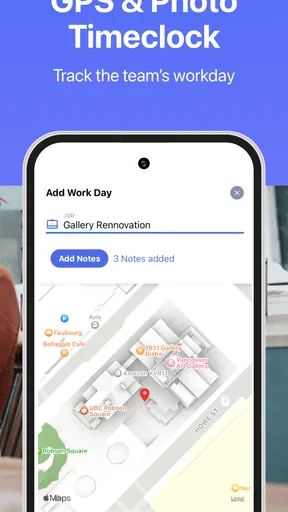
Employee Link - Timesheets is a comprehensive app designed for managing employee work hours and schedules. It helps businesses track time efficiently, handle payroll calculations, and organize shifts seamlessly. With features like GPS tracking and real-time data updates, it provides a reliable solution for both employers and employees to streamline their time management processes.
Is Employee Link - Timesheets compatible with both Android and iOS devices?
Yes, Employee Link - Timesheets is compatible with both Android and iOS platforms, allowing users to access and manage their timesheets across different devices. This cross-platform availability ensures flexibility and convenience, enabling employees and managers to update and review timesheets on the go, regardless of the device they are using.
Does Employee Link - Timesheets offer integration with other payroll systems?
Employee Link - Timesheets is designed to integrate seamlessly with various payroll systems, making it easier for businesses to manage their payroll processes. By syncing data across platforms, it minimizes errors and simplifies payroll management. Users should check specific compatibility details on the app’s official site or within the app settings to ensure smooth integration.
How secure is the data on Employee Link - Timesheets?
The app prioritizes user data security by implementing advanced encryption protocols and secure data storage solutions. Employee Link - Timesheets ensures that sensitive information, such as employee work hours and payroll data, is protected against unauthorized access. Regular updates and security patches further enhance the app’s data protection measures, providing peace of mind for its users.
Are there any subscription fees or in-app purchases for Employee Link - Timesheets?
Employee Link - Timesheets may offer both free and premium versions, with the latter providing additional features and capabilities. Users can expect subscription fees or in-app purchases for advanced tools and functionalities. It is advisable to review the pricing details on the app store or the app’s official website to understand the cost structure before downloading.


